
 What Is the Thailand Digital Arrival Card (TDAC)? upadated on 03 April 2026
The Thailand Digital Arrival Card (TDAC) is an online form required for travelers entering Thailand. It replaces the old paper TM6 form and must be completed before arrival. how to fill TDAC Thailand
This digital system helps Thai immigration process travelers faster and more securely.
 Who Needs to Fill the TDAC?| how to fill TDAC Thailand
You must complete the TDAC if you are:
- A tourist entering Thailand
- A business traveler
- A long-stay visitor
 Even visa-exempt travelers may be required to submit it.
 When Should You Complete the TDAC?
You should complete the form:
 Within 72 hours before your arrival
Before boarding your flight
 Do NOT wait until the last minute — errors can delay entry.
 Step-by-Step: How to Fill TDAC (2026)
Step 1: Access the Official Website
Go to the official Thailand immigration TDAC website.
Avoid third-party or paid websites.
Step 2: Enter Personal Information | how to fill TDAC Thailand
Fill in:
- Full name (exactly as passport)
- Date of birth
- Nationality
 Tip: One mistake = possible rejection
Step 3: Passport Details |how to fill TDAC Thailand
You’ll need:
- Passport number
- Expiry date
- Country of issue
Double-check everything carefully
Step 4: Travel Information|how to fill TDAC Thailand
Provide:
- Flight number
- Arrival date
- Purpose of visit
Step 5: Accommodation in Thailand|how to fill TDAC Thailand
Enter:
- Hotel name OR address
- City (Bangkok, Phuket, etc.)
If unsure, use your first booked hotel FROM TRIP.COM
Step 6: Health & Declaration Section
Some versions may ask:
- Health declaration
- Recent travel history
Step 7: Review & Submit|how to fill TDAC Thailand
Before submitting:
Check ALL details
Fix spelling errors
Confirm passport info
Step 8: Save Your Confirmation |how to fill TDAC Thailand
After submission:
- Download PDF OR
- Take screenshot
 Keep it on your phone for immigration
 Common TDAC Mistakes (Avoid These)
Many travelers get delayed because of:
- Wrong passport number
- Using fake websites
- Paying unnecessary fees
- Not saving confirmation
Important Warning About Fake TDAC Websites
Some websites pretend to be official but charge high fees.
Always use the official immigration website only
 What Happens at the Airport?|how to fill TDAC Thailand
At immigration:
- Officers may check your TDAC
- You may need to show confirmation
If everything is correct → fast entry
If wrong → delays or re-submission
 Pro Tips for a Smooth Entry|how to fill TDAC Thailand
- Fill TDAC 1–2 days before flight
- Use correct passport spelling
- Avoid public WiFi when submitting
- Keep backup screenshot
 Final Thoughts|how to fill TDAC Thailand
The Thailand Digital Arrival Card (TDAC) is simple if done correctly.
Following the steps above will help you avoid delays, scams, and unnecessary stress.
Step 1: Prepare Your Information
- Valid passport details
- Flight or vehicle number and arrival date
- Accommodation address in Thailand
- Contact phone number and email
- Health info and vaccination records (if applicable)
Step 2: Visit the Official TDAC Website
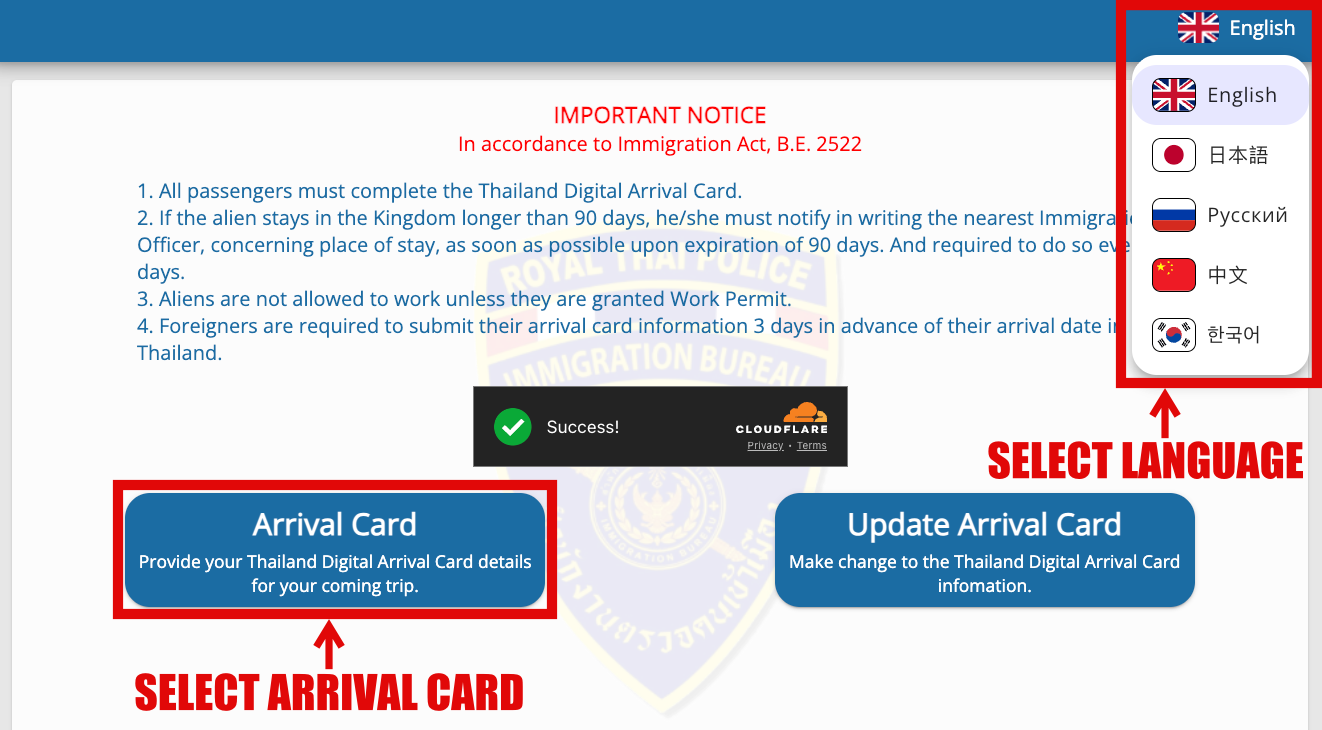
Go to https://tdac.immigration.go.th and select “Arrival Card” to start filling the form.
The TDAC website supports multiple languages including:
- English
- Japanese (日本語)
- Russian (русский)
- Chinese (中文)
- Korean (한국어)
You can choose your preferred language from the dropdown menu on the homepage for easier navigation.
Please note: Although the interface can be viewed in your chosen language, all information you enter on the form should be in English as required by Thai immigration authorities.
Step 3: Enter Your Personal Details
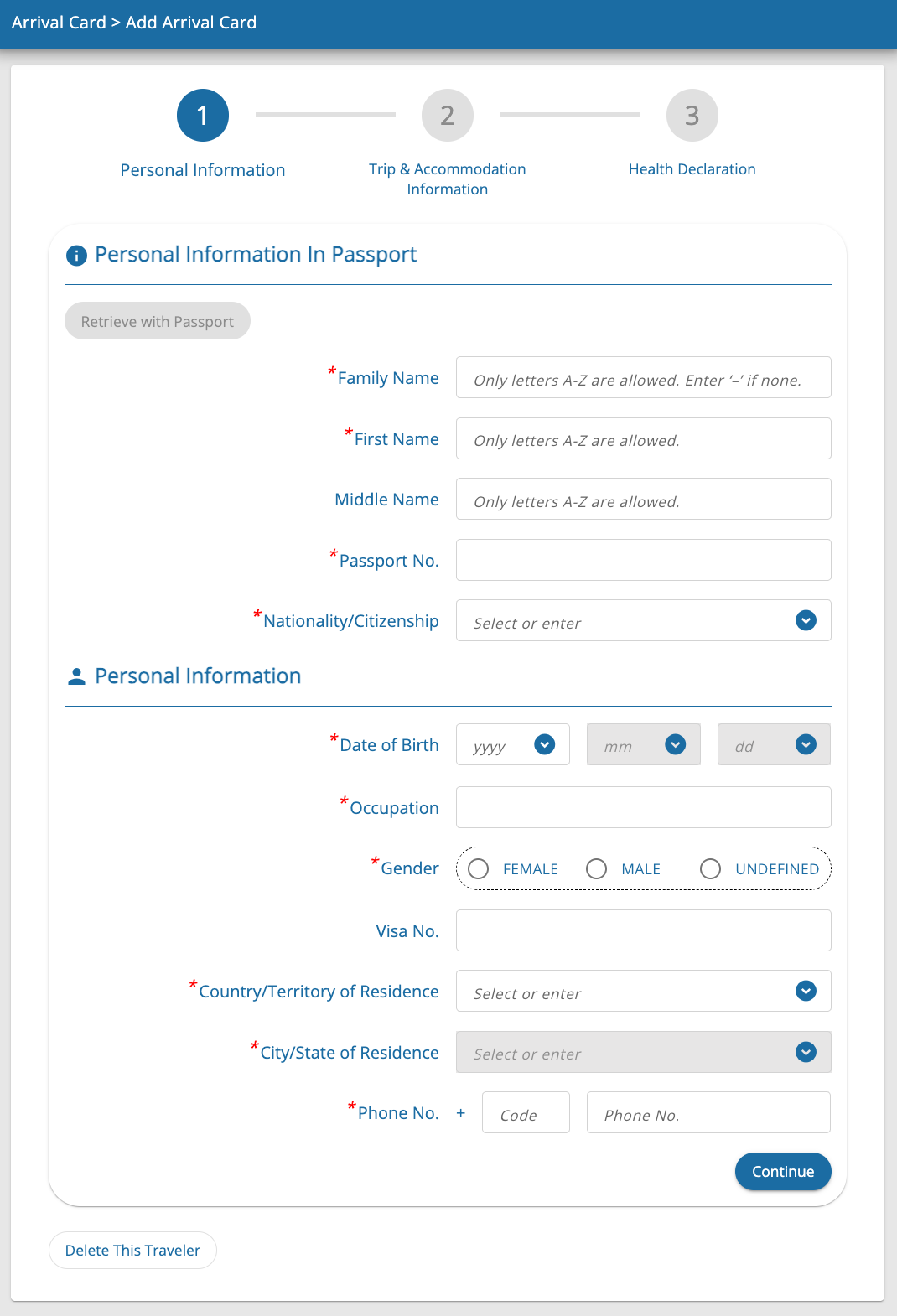
- Family name (surname) as on passport
- First name as on passport
- Middle name as on passport (optional you can leave blank if not applicable)
- Passport number and nationality
- Nationality/citizenship
- Date of birth
- Occupation
- Gender
- Visa number (optional you can leave blank if not applicable)
- Country/Territory of residence
- City/State of residence
- Phone number with country code
Step 4: Input Travel Details
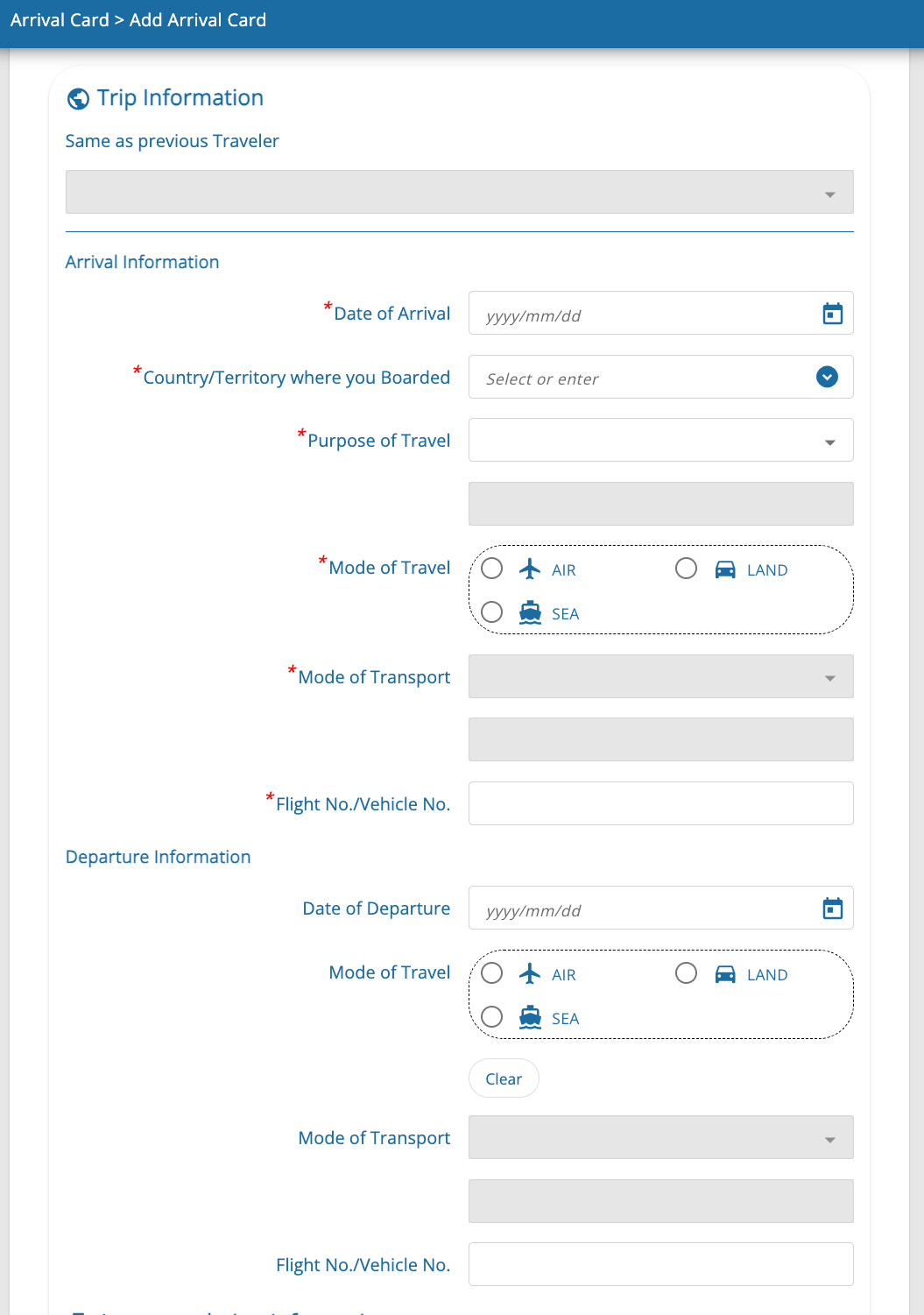
- Arrival date
- Country where you boarded
- Purpose of travel
- Mode of travel (air, land or sea)
- Mode of trasport (air – commercial flight, private-cargo airplane or other / land – car, train or other / sea – cruise, commercial vessel or other)
- Flight or vehicle number
- Departure plans from Thailand
Step 5: Input Accommodation Details
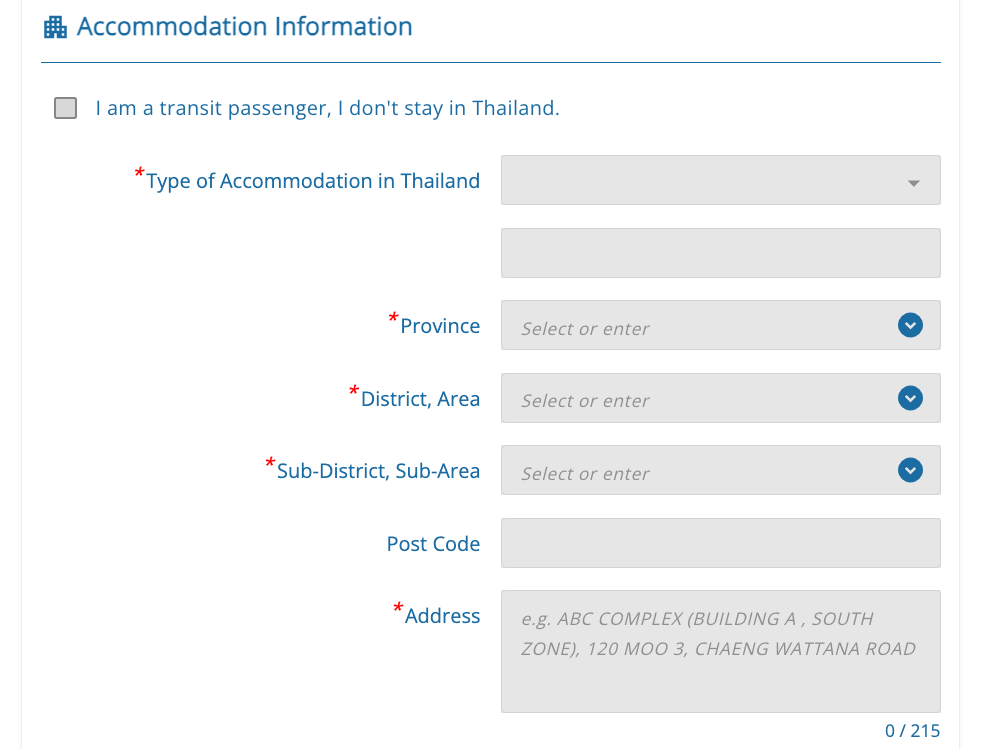
- Type of accommodation in Thailand (hotel, youth hostel, guest house, friend’s house, apartment/condo or other)
- Province
- District/Area
- Sub-District/Sub-Area
- Postal code
- Full Address (include hotel or condo name if applicable)
Step 6: Complete Health Declaration
Answer questions about recent illnesses, exposure, and vaccination status.
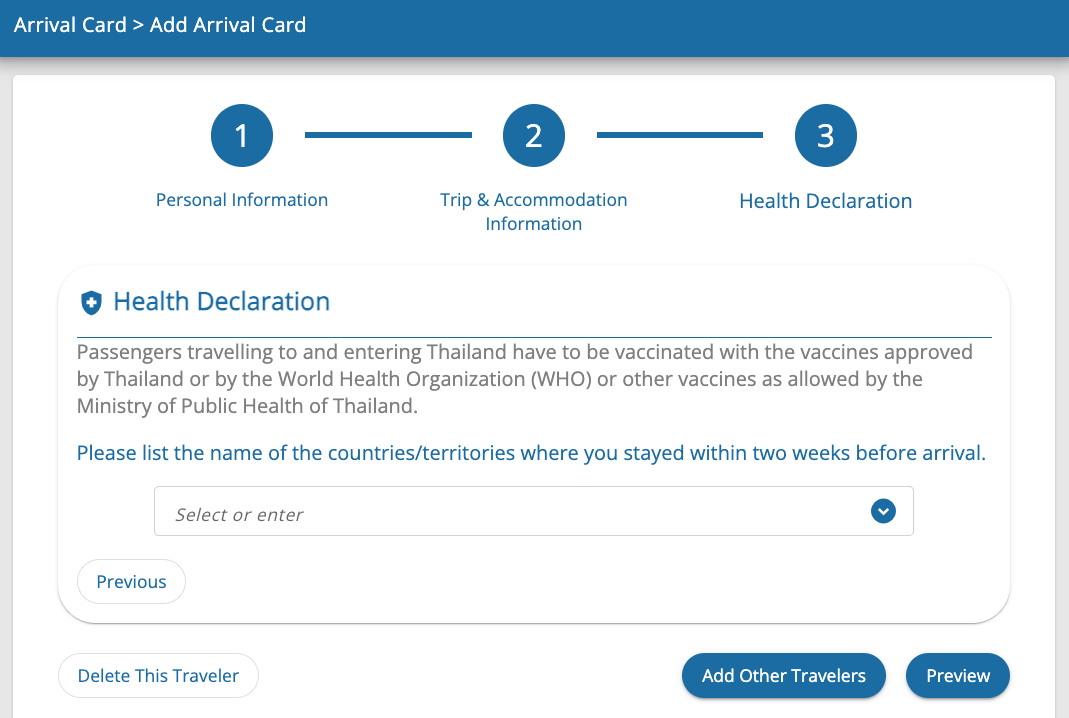
Step 6: Review and Submit
- Verify accuracy of all details
- Provide valid email to receive confirmation
- Submit and download or print the confirmation to show on arrival
Note: Failure to submit the TDAC before arrival may cause delays or denial of entry.
Updating Your TDAC
You can update travel and accommodation details before arrival if plans change. Personal identification data cannot be changed without submitting a new form.
Tips for Travelers
- Complete the TDAC at least 24 hours before arrival
- Use a device with internet access: phone, tablet, or PC
- Keep your confirmation email available for checkpoints
- For groups, submit all traveler details in one submission
For further information, visit the official TDAC User Guide.